

Your page, framed, with its decisions on the outside.
One development dependency turns the values that decide how your project looks into controls you can turn. What you approve is written into your repository as a file, and your agent applies it to the source.
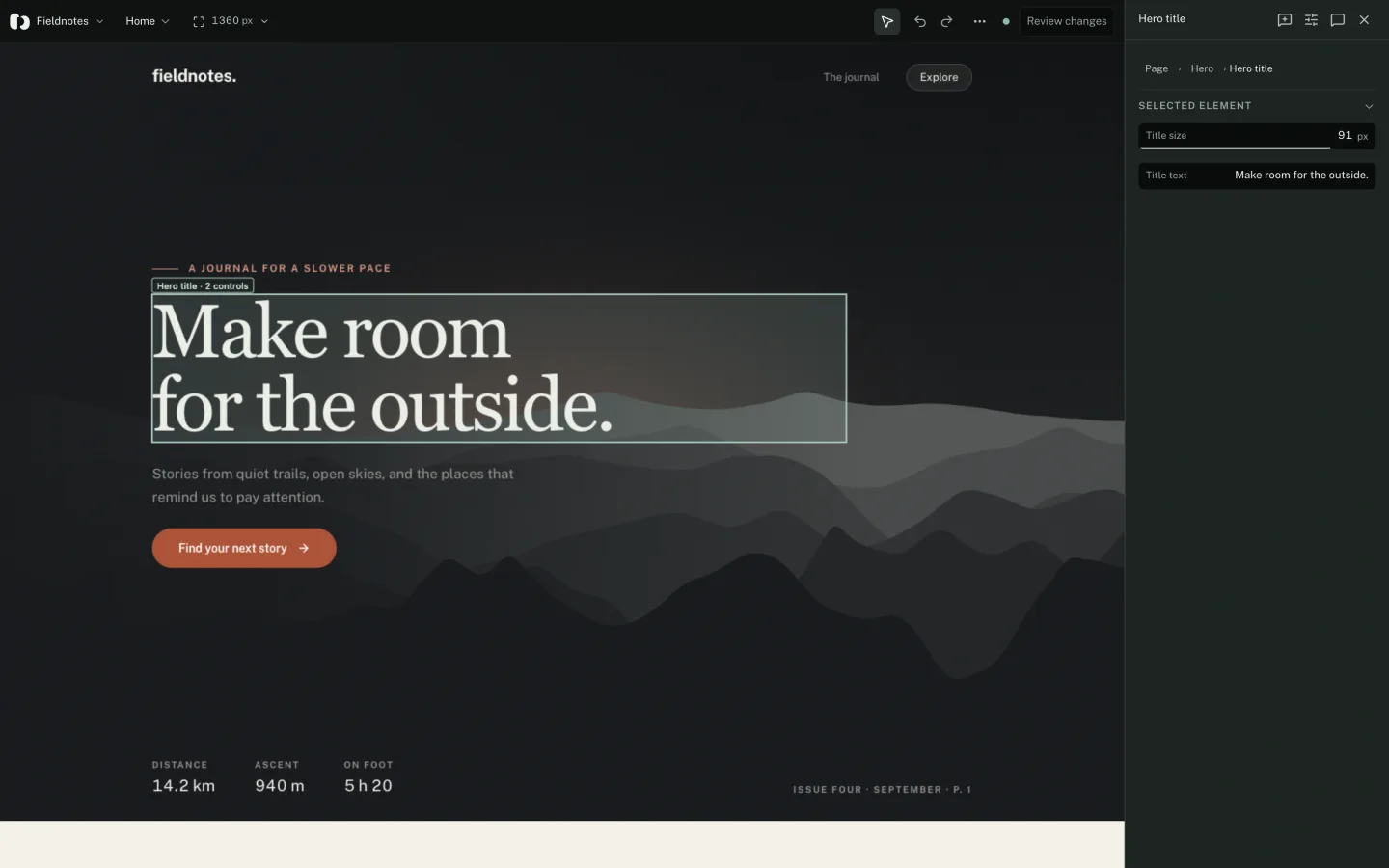
Describe what can be tuned.
One file at the root of the project is the contract. It says which controls exist, where the page runs, and which revision of your source it describes.
Change that revision whenever you change the code the controls describe. If the two disagree the workbench waits, instead of applying a batch to code it no longer matches.
{
  "version": 1,
  "id": "fieldnotes",
  "revision": "study-1",
  "origin": "http://localhost:3000",
  "pages": [{ "id": "home", "name": "Home", "path": "/" }],
  "groups": [{ "id": "brand", "label": "Brand" }],
  "parameters": [
    { "id": "accent", "kind": "color", "label": "Accent",
      "group": "brand", "defaultValue": "#bc593d" }
  ],
  "bindings": [
    { "paramId": "accent", "scope": "global",
      "kind": "css-variable", "property": "--accent" }
  ]
}
parseManifest throws on anything it does not accept, and the message names what is wrong. Call it yourself, so the failure lands in your build and not in the workbench.
Say how far each control reaches.
A binding names a parameter, a scope and a destination. Scope is declared by you and does not change when someone selects a different instance, so a control that moves every card says so before it is used.
Scope
- global
- The whole application. One binding on a design token moves everything that reads it.
- page
- One page, named by its pageId in the manifest.
- element
- One instrumented family. Leave instance out and it applies to every card of that kind, which the review spells out before you send it.
Destination
- css-variable
- Writes a custom property. The first choice for design tokens.
- style
- Writes one declared property on the target. The original inline value and its priority are preserved and restored.
- adapter
- Calls a read / apply / restore adapter you registered. For anything CSS cannot express: copy, state, a canvas, a composite value.
Name the elements worth talking about.
One attribute makes an element something the workbench can point at and a comment can survive a refactor on. Repeated components are told apart by an instance key, which descendants inherit.
Uninstrumented elements can still be selected and commented on. Their reference is provisional, and has to be reattached after a reload.
<article data-paramrig-id="story-card"
         data-paramrig-instance="coast"
         data-paramrig-label="Story card"
         data-paramrig-source="src/StoryCard.tsx">
  <h2 data-paramrig-id="story-title">Following the coastline</h2>
</article>
Without a label the identifier is read as a sentence, so story-card becomes Story card. Failing that: the accessible name, then the words on screen.
Connect, in development only.
The call is guarded and the bundler drops it: the package declares sideEffects: false, so the whole import leaves the production build with the branch.
Always dispose, on unmount and on hot-module replacement. A second connection without one is handled, but the warning is telling you the cleanup is missing.
useEffect(() => {
  if (!import.meta.env.DEV) return
  const connection = connectWeb({
    manifest: parseManifest(manifestFile),
    adapters: {
      headings: {
        read: () => currentHeadingFont,
        apply: value => setHeadingFont(String(value)),
        restore: () => setHeadingFont(initialHeadingFont),
      },
    },
  })
  return () => connection.dispose()
}, [])
One header to add
The workbench opens your page in a cross-origin frame, so your development server has to allow it: Content-Security-Policy: frame-ancestors ‘self’ http://localhost:5174, with no conflicting X-Frame-Options. Scope it to the development configuration and never relax it in production.
Tune it, mark it up, approve it.
Turn the controls against the running page. Select an element and comment on it. Draw notes, arrows, rectangles and highlights on the element or on the document. Compare the current state against a reference or a named snapshot.
Review shows before and after for every change and lets you drop the ones you do not want. Dropping a control puts its source value back, so the file never asks for something the values beside it contradict.
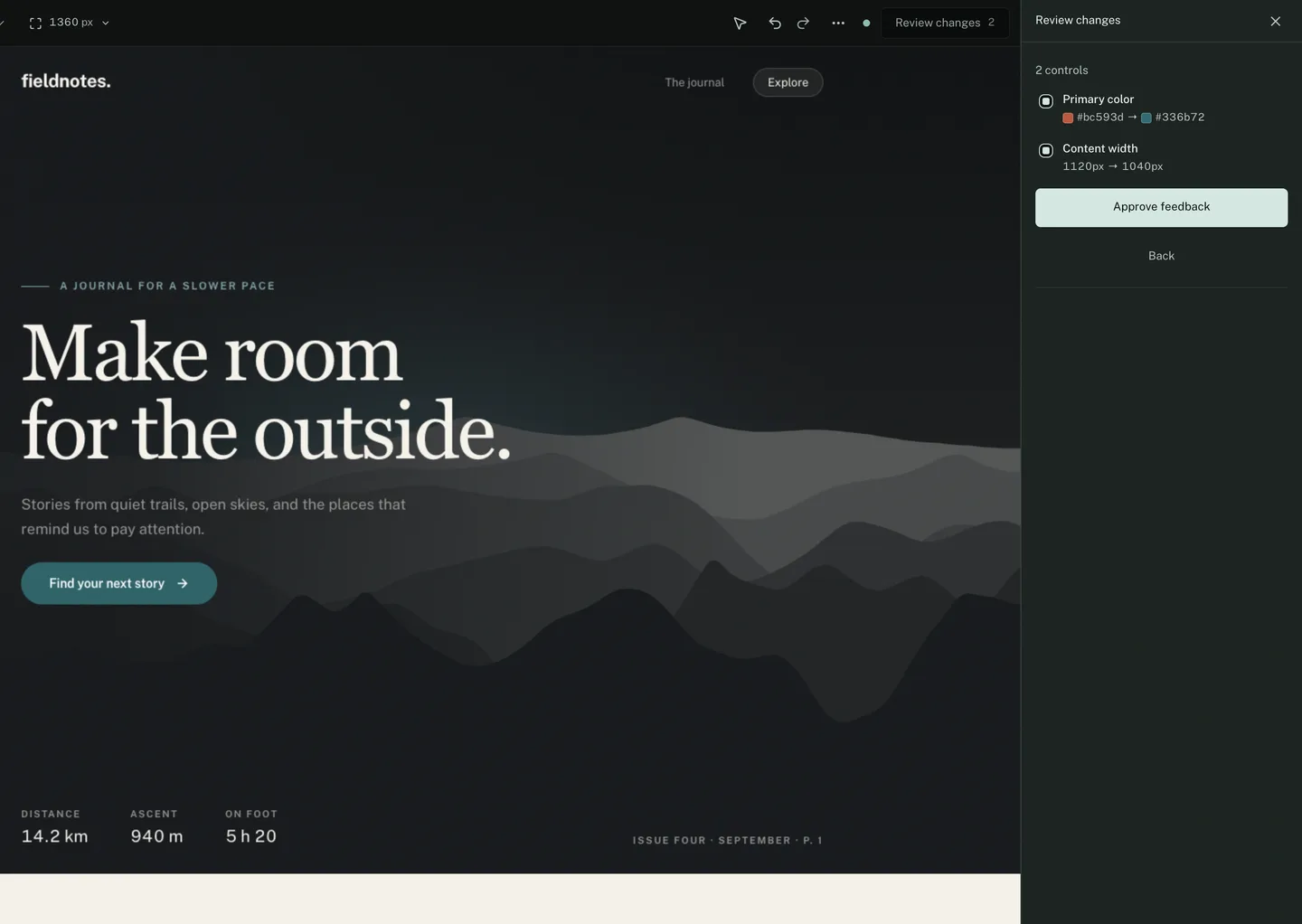
Hand the file over.
Approving writes one immutable batch and gives you the instruction to paste into your agent. The batch restates every difference from your source, not only what moved since last time, so the newest file alone is the whole picture.
The agent applies the values in the real files, sets each changed defaultValue, moves the revision, and writes one response answering each ticket as implemented or needs-info. A response is a claim, not an approval: only you close a ticket.
Read the new approved batch in .paramrig/batches, apply its
values and requested changes to this project, preserve target
IDs, and write a response following .paramrig/README.md.
What lands in the repository
- manifest.json
- Yours. It describes your code, so it is source. Commit it.
- batches/
- Written by ParamRig, immutable. The record of what was asked.
- responses/
- Written by your agent. What it did, and how to check it.
- draft.json
- Rewritten continuously and not approved instructions. Ignored by the .gitignore ParamRig writes when there is none.
- captures/
- Ticket images. Large, and reproducible from the batch. Ignored too.
When it cannot connect, it says which of the three reasons it is.
- The SDK announces itself and the workbench answers. That reply pins the origin and session every later message is checked against. Nothing listens before the reply, and your application’s own clicks pass through.
- If the preview does not answer within eight seconds, the workspace names the three causes in the order they usually are: the server is not at the manifest’s origin, the page does not load the SDK, or framing is refused.
- An announcement heard changes that answer. It proves the page is reachable and the frame allowed, so you get the message that fits.
- While the preview has not answered, the tools are inert and not just dimmed, and review is refused. Reconnecting resends the mode, targets and values, so a preview that reloads comes back where it was.
- A response naming a revision that has moved, a batch that does not exist, or a ticket outside its own batch is reported and not applied.
Start with five controls.
Number, color, select, switch and text cover most of what a person wants to move, and every one of them reads clearly in a review.