

One value contract, sixty-six instruments.
A number is a number. How you turn it is not: an exact field, a gauge, a logarithmic scale that marks its decades, a knob, a range whose bounds cannot pass each other. The rig declares which one this value deserves.
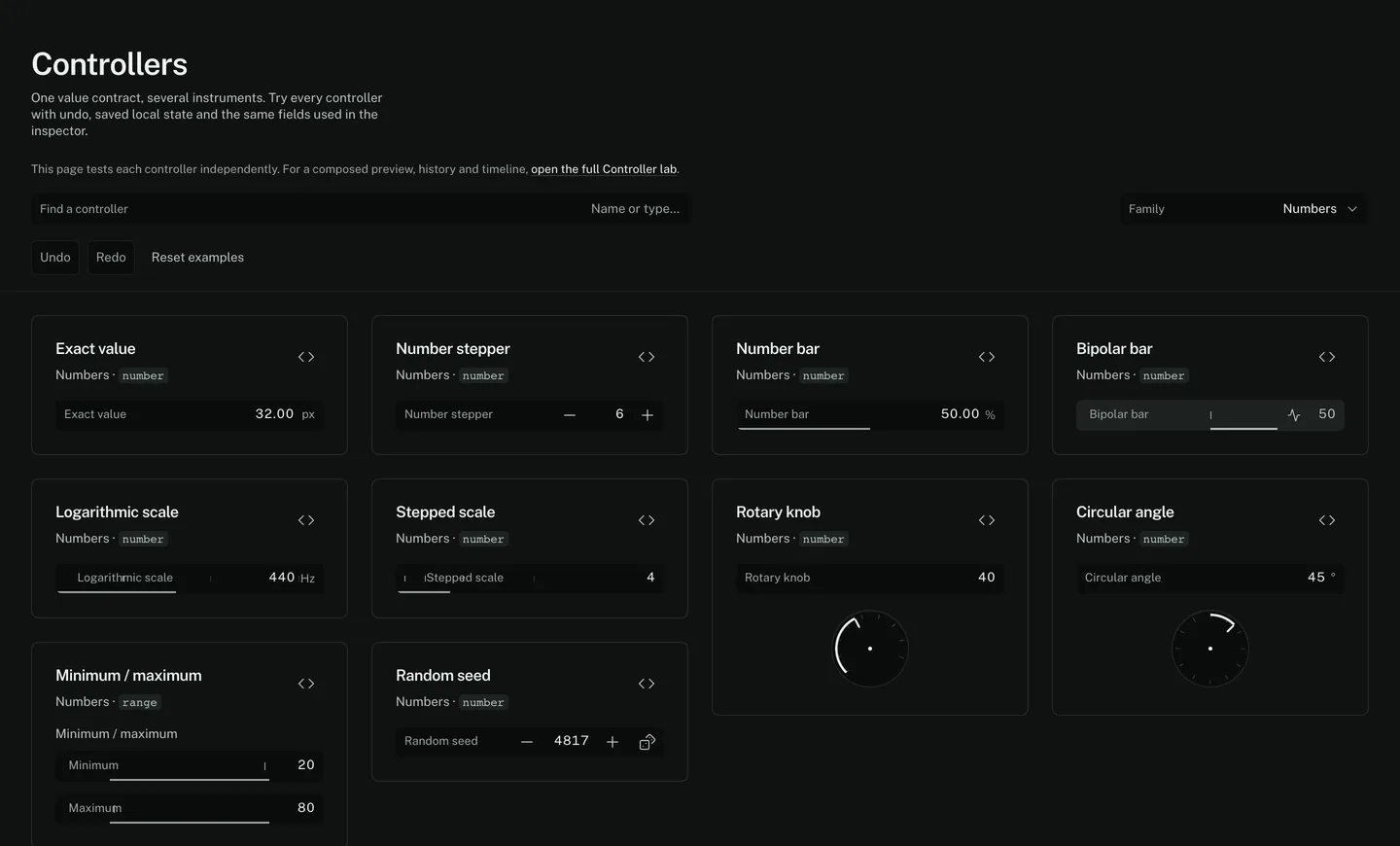
Live. This is ParamRig itself, running in the page.A capture. The window here is too narrow to work in; open it full size to use the controllers.Open it full size ↗
Eleven families.
Numbers
Exact field with convertible display units, stepper, gauge, bipolar, logarithmic and stepped scales, rotary knob, angle, min/max range, seed.
10Position & dimensions
Vectors 2D and 3D, XY pad, dimensions with proportional lock, directions, rotation, anchor presets, a full transform.
10Color & appearance
RGB/HSL and hexadecimal color, alpha, palette, gradient stops and geometry, opacity ramp, HDR color with intensity, material preview, shadow.
9Choices
Switch, tri-state, segmented, dropdown, searchable options, multiple selection, object reference.
7Text & typography
Single and multiline text, font choice, a typography group, variable font axes.
4Curves & profiles
Cubic Bézier, ordered ramp or falloff profile, editable 2D path, overlapping radial profiles.
4Resources
Previewable image, texture or SVG. A binary font, model or environment asset. A parameter preset.
3Scene instruments
2D and 3D transform gizmos, texture framing, camera orbit. Each drag is one undoable gesture.
4Actions
Apply declared values, trigger counter, randomisation restricted to explicitly allowed targets, reset a selection.
4Collections
Value list, repeatable layers, linked box values and stroke.
4Value sources & animation
Duration and playhead, and the seven modes a number can be driven by.
7All 66, by name.
Read off the running catalogue, not typed out. Each family opens that family and no other.
- Exact valuenumber
- Number steppernumber
- Number barnumber
- Bipolar barnumber
- Logarithmic scalenumber
- Stepped scalenumber
- Rotary knobnumber
- Circular anglenumber
- Minimum / maximumrange
- Random seednumber
- Vector 2Dvector
- XY padvector
- Vector 3Dvector
- Dimensions 2Dvector
- Dimensions 3Dvector
- Direction 2Dgroup
- Direction 3Dgroup
- Rotation 3Dvector
- Anchor / pivotvector
- Transformgroup
- Color & channelscolor
- Color with opacitycolor
- Color palettepalette
- Color gradientgradient
- Opacity ramppoints
- Gradient geometrygroup
- HDR colorgroup
- Material presetselect
- Shadowgroup
- Switchswitch
- Segmented choiceselect
- Dropdownselect
- Tri-state choiceselect
- Searchable choiceselect
- Multiple choicemultiselect
- Object referenceselect
- Texttext
- Multiline texttext
- Typographygroup
- Variable font axesgroup
- Cubic Béziercurve
- Ramp / falloff profilepoints
- Editable 2D pathpoints
- Radial profileradial
- Image / texture / SVGresource
- Font / model / environmentresource
- Parameter presetpreset
- 2D transform gizmogizmo2d
- 3D transform gizmogizmo3d
- Texture frametextureFrame
- Camera rigcamera
- Apply compositionaction
- Trigger impulseaction
- Randomize allowed valuesaction
- Reset numeric groupaction
- Value listlist
- Repeatable layerslist
- Linked sides / cornersvector
- Strokegroup
- Durationnumber
- Time positionnumber
- Modulated valuenumber
- Macronumber
- Expression value sourcenumber
- Blend amountnumber
- Blended outputnumber
A value can also be a curve.
Grouped tracks, zoom, keyframe selection and dragging, copy and paste, precise time, value and easing controls, and a playback range. The curve editor edits the selected track, with its real keys and their interpolation, and a line that samples the easing in force.
Undo records a complete drag as one action. Scrubbing and playing do not fill the history. Changing the duration scales key times and the playback range, and that is undoable too.
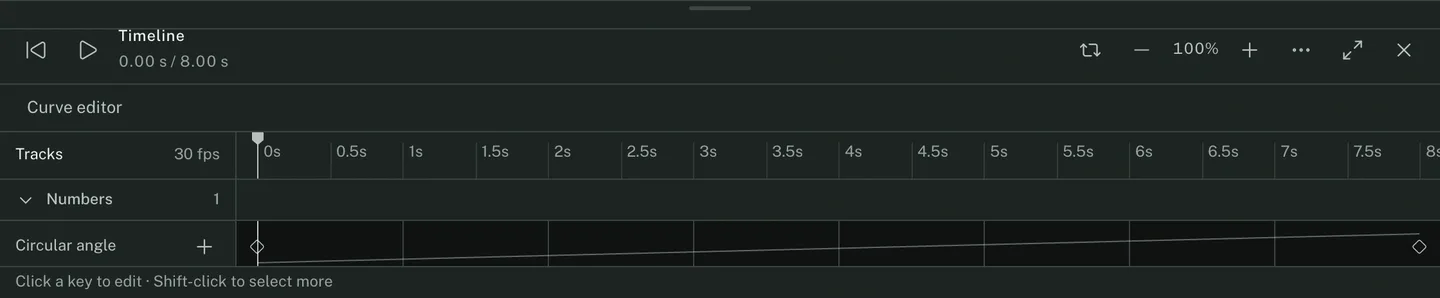
Seven ways for a number to get its value.
- local
- The number is its own value. The default.
- parameter
- It reads another editable number.
- expression
- Parameter names, t, pi, arithmetic and a small allowlist of maths functions. It never runs JavaScript.
- animation
- A track on the timeline, with keys and easing.
- macro
- One input mapped into a declared output range.
- modulation
- Samples time without rewriting the local value. Noise is seeded. Envelopes have attack, hold and release.
- blend
- Interpolates two numeric endpoints, by a fixed amount or by another parameter.
Every top-level numeric parameter owns exactly one source, stored in drafts, snapshots and exports. Changing mode replaces the previous driver instead of stacking one on top of it. An invalid source or a circular reference leaves the stored value usable and reports the error on that parameter’s own control.
Two states, one playhead.
Reference and Current sample animated values at the same position in time, so a comparison is between two results and not between two moments.
Snapshots can be named, restored and removed, and restoring one brings back the active reference with it. Those actions are undoable. History keeps the last hundred actions of the session.
The edges of this build.
- Tracks animate top-level numeric values. Composite, vector and color fields are editable, saved, exported and undoable, but do not yet take per-component tracks.
- A generic profile control does not automatically become timeline easing. The rig decides how to consume its data.
- JSON exports carry file metadata and a local resource identifier, not embedded binary files. A JSON alone does not move an image between browsers.
- Drafts and snapshots persist in browser storage. Undo history lasts for the session and is not restored after a reload.
- HDR is a color-and-intensity composite, not a claim that the browser’s color picker shows an HDR gamut.
- Object references and font choices resolve against options the rig supplies. They do not discover scene objects or installed system fonts.
Every controller, in one page.
Each example runs the same field the inspector runs, with undo, saved local state and its declaration on show.